

MIN Function in Excel
The MIN function of Excel finds the minimum (or smallest) value from a list of numeric values. It is a Statistical function of Excel, which returns only a numeric value as the output. The MIN function is available in almost all versions of Excel.
For example, in the following image, the formula “=MIN(A2:A6)” helps find the minimum value from the numbers of column A.
Frequently Asked Questions (FAQs)
The MIN function finds the minimum value from a series of numerical values. The function can also be supplied cell references, range references or named ranges containing numbers. It is an in-built function of Excel and is categorized as a Statistical function.
The syntax of the MIN function of Excel is stated as follows:
“MIN(number1,[number2],…)”
Note: To know more about the arguments, refer to the heading “syntax of the MIN() function of Excel” given in this article.
Let us consider an example to understand how to use the MIN function in Excel. The steps for using this function are listed as follows:
Step 1: Select an empty cell for the output, like cell B7 in this example.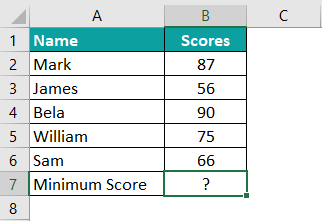
Step 2: Enter the following MIN formula in cell B7. Exclude the beginning and ending double quotation marks while entering this formula in Excel.
“=MIN(B2:B6)”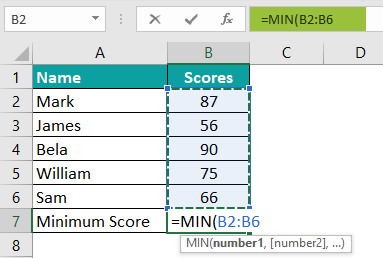
Step 3: Press the “Enter” key. The output is 56, as shown in the following image.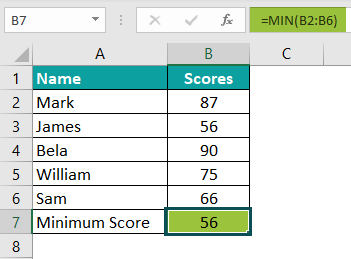
The steps to access the MIN function in Excel are listed as follows:
a. Click the “more functions” drop-down (in the “function library” group) from the Formulas tab of Excel.
b. Expand the option “statistical” and choose “MIN.”
c. Specify the arguments in the “function arguments” window.
d. Click “Ok” to find the minimum value.
The selections of steps “a” and “b” are shown in the following image.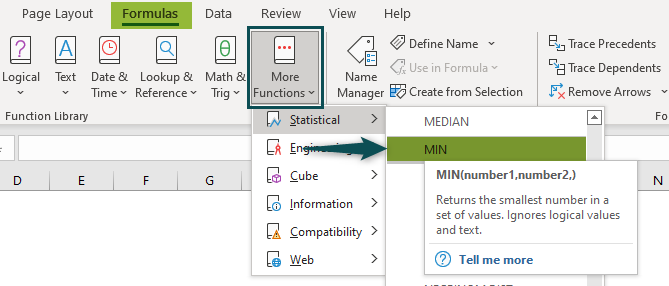
Download Template
📥Download the ready-to-use Excel template to practice this tutorial yourself.
Download Excel TemplateRecommended Articles
This has been a guide to the MIN function of Excel. Here, we learn how to use the MIN formula with the help of examples and a downloadable Excel template. You can learn more from the following articles –