

What Is Insert a Function in Excel?
Insert a Function in excel is a powerful tool that allows users to enhance and automate their data analysis process. With this function, professionals can perform a multitude of complex and advanced calculations efficiently. The feature provides an extensive range of functions such as mathematical, statistical, financial, logical, and text operations that cater to various business needs. By using the Insert Function option in Excel, professionals can locate specific functions based on their requirements or search for them by category or name. This capability saves precious time and ensures accurate results for tasks ranging from simple arithmetic calculations to sophisticated statistical analysis
In the following example, we will explore how to use Excel functions to calculate the maximum of numbers using the Insert Function Dialog Box.
📥Download the ready-to-use Excel template to practice this tutorial yourself.
Download Excel TemplateTo begin, we need to calculate the desired output in cell A5. It’s as simple as following these steps:
Frequently Asked Questions (FAQs)
The keyboard shortcut “SHIFT + F3” can be used to open the Insert Function dialog window. Additionally, pressing the F4 key allows you to repeat the previous command or action, if applicable. These shortcuts are valuable tools that enhance efficiency and productivity in various tasks.
Consider the below example.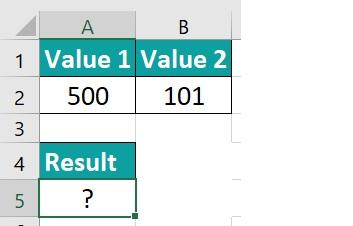
Select the “SHIFT + F3” shortcut keys; this will open up the Insert Function window. From the list of functions, choose the EVEN function and click on the OK button. In the Functional Argument window, enter the values that you want to calculate.
The result will be displayed in cell A5, just like in the example image provided.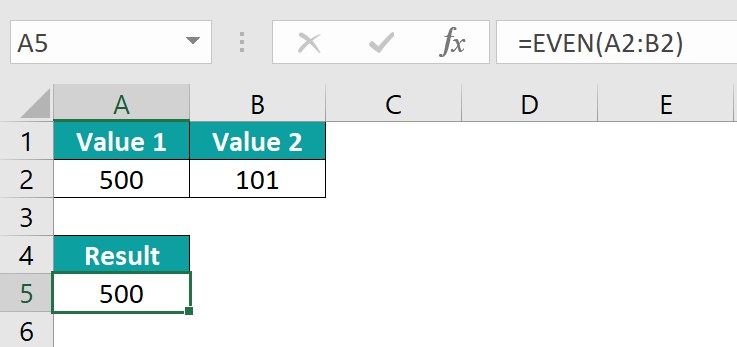
The purpose of the insert function in Excel is to add new rows or columns to a spreadsheet. This allows for more data to be entered and maintains the integrity of the existing information by shifting it accordingly. The insert function can come in handy when you need to expand your dataset, especially when dealing with large amounts of data. Whether you want to insert a single row or column, multiple rows or columns, or an entire worksheet, Excel provides various options to suit your needs.
Some of the most frequently used functions include mathematical operations like addition, subtraction, multiplication, and division. Users can also access statistical functions like average, standard deviation, and count. More advanced functions, such as those related to financial analysis, are also available. These include calculating present value, future value, and interest rates using formulas like NPV or IRR. Additionally, users can leverage logical functions such as IF statements to create conditional outcomes based on specific criteria.
Download Template
📥Download the ready-to-use Excel template to practice this tutorial yourself.
Download Excel TemplateRecommended Articles
Guide to Insert a Function in Excel & its meaning. Here we explain how to Insert an Excel function along with examples & downloadable excel template. You can learn more from the following articles –